Wednesday, June 19, 2019

Balanced Binary Tree

Given a binary tree, determine if it is height-balanced.
For this problem, a height-balanced binary tree is defined as:
a binary tree in which the depth of the two subtrees of every node never differ by more than 1.
Example 1:
Given the following tree [3,9,20,null,null,15,7]:
    3
   / \
  9  20
    /  \
   15   7
Return true.

Example 2:
Given the following tree [1,2,2,3,3,null,null,4,4]:
       1
      / \
     2   2
    / \
   3   3
  / \
 4   4
Return false.

Data Structure and Algorithms - Tree

Tree represents the nodes connected by edges. We will discuss binary tree or binary search tree specifically.
Binary Tree is a special datastructure used for data storage purposes. A binary tree has a special condition that each node can have a maximum of two children. A binary tree has the benefits of both an ordered array and a linked list as search is as quick as in a sorted array and insertion or deletion operation are as fast as in linked list.
Binary Tree

Important Terms

Following are the important terms with respect to tree.
  • Path − Path refers to the sequence of nodes along the edges of a tree.
  • Root − The node at the top of the tree is called root. There is only one root per tree and one path from the root node to any node.
  • Parent − Any node except the root node has one edge upward to a node called parent.
  • Child − The node below a given node connected by its edge downward is called its child node.
  • Leaf − The node which does not have any child node is called the leaf node.
  • Subtree − Subtree represents the descendants of a node.
  • Visiting − Visiting refers to checking the value of a node when control is on the node.
  • Traversing − Traversing means passing through nodes in a specific order.
  • Levels − Level of a node represents the generation of a node. If the root node is at level 0, then its next child node is at level 1, its grandchild is at level 2, and so on.
  • keys − Key represents a value of a node based on which a search operation is to be carried out for a node.

Binary Search Tree Representation

Binary Search tree exhibits a special behavior. A node's left child must have a value less than its parent's value and the node's right child must have a value greater than its parent value.
Binary Search Tree
We're going to implement tree using node object and connecting them through references.

Tree Node

The code to write a tree node would be similar to what is given below. It has a data part and references to its left and right child nodes.
struct node {
   int data;   
   struct node *leftChild;
   struct node *rightChild;
};
In a tree, all nodes share common construct.

BST Basic Operations

The basic operations that can be performed on a binary search tree data structure, are the following −
  • Insert − Inserts an element in a tree/create a tree.
  • Search − Searches an element in a tree.
  • Preorder Traversal − Traverses a tree in a pre-order manner.
  • Inorder Traversal − Traverses a tree in an in-order manner.
  • Postorder Traversal − Traverses a tree in a post-order manner.
We shall learn creating (inserting into) a tree structure and searching a data item in a tree in this chapter. We shall learn about tree traversing methods in the coming chapter.

Insert Operation

The very first insertion creates the tree. Afterwards, whenever an element is to be inserted, first locate its proper location. Start searching from the root node, then if the data is less than the key value, search for the empty location in the left subtree and insert the data. Otherwise, search for the empty location in the right subtree and insert the data.

Algorithm

If root is NULL 
   then create root node
return

If root exists then
   compare the data with node.data
   
   while until insertion position is located

      If data is greater than node.data
         goto right subtree
      else
         goto left subtree

   endwhile 
   
   insert data
 
end If      

Implementation

The implementation of insert function should look like this −
void insert(int data) {
   struct node *tempNode = (struct node*) malloc(sizeof(struct node));
   struct node *current;
   struct node *parent;

   tempNode->data = data;
   tempNode->leftChild = NULL;
   tempNode->rightChild = NULL;

   //if tree is empty, create root node
   if(root == NULL) {
      root = tempNode;
   } else {
      current = root;
      parent  = NULL;

      while(1) {                
         parent = current;

         //go to left of the tree
         if(data < parent->data) {
            current = current->leftChild;                
            
            //insert to the left
            if(current == NULL) {
               parent->leftChild = tempNode;
               return;
            }
         }
   
         //go to right of the tree
         else {
            current = current->rightChild;
            
            //insert to the right
            if(current == NULL) {
               parent->rightChild = tempNode;
               return;
            }
         }
      }            
   }
}

Search Operation

Whenever an element is to be searched, start searching from the root node, then if the data is less than the key value, search for the element in the left subtree. Otherwise, search for the element in the right subtree. Follow the same algorithm for each node.

Algorithm

If root.data is equal to search.data
   return root
else
   while data not found

      If data is greater than node.data
         goto right subtree
      else
         goto left subtree
         
      If data found
         return node
   endwhile 
   
   return data not found
   
end if      
The implementation of this algorithm should look like this.
struct node* search(int data) {
   struct node *current = root;
   printf("Visiting elements: ");

   while(current->data != data) {
      if(current != NULL)
      printf("%d ",current->data); 
      
      //go to left tree

      if(current->data > data) {
         current = current->leftChild;
      }
      //else go to right tree
      else {                
         current = current->rightChild;
      }

      //not found
      if(current == NULL) {
         return NULL;
      }

      return current;
   }  
}
To know about the implementation of binary search tree data structure, please click here.

Data Structure and Algorithms - Linked List

A linked list is a sequence of data structures, which are connected together via links.
Linked List is a sequence of links which contains items. Each link contains a connection to another link. Linked list is the second most-used data structure after array. Following are the important terms to understand the concept of Linked List.
  • Link − Each link of a linked list can store a data called an element.
  • Next − Each link of a linked list contains a link to the next link called Next.
  • LinkedList − A Linked List contains the connection link to the first link called First.

Linked List Representation

Linked list can be visualized as a chain of nodes, where every node points to the next node.

Linked List
As per the above illustration, following are the important points to be considered.
  • Linked List contains a link element called first.
  • Each link carries a data field(s) and a link field called next.
  • Each link is linked with its next link using its next link.
  • Last link carries a link as null to mark the end of the list.

Types of Linked List

Following are the various types of linked list.
  • Simple Linked List − Item navigation is forward only.
  • Doubly Linked List − Items can be navigated forward and backward.
  • Circular Linked List − Last item contains link of the first element as next and the first element has a link to the last element as previous.

Basic Operations

Following are the basic operations supported by a list.
  • Insertion − Adds an element at the beginning of the list.
  • Deletion − Deletes an element at the beginning of the list.
  • Display − Displays the complete list.
  • Search − Searches an element using the given key.
  • Delete − Deletes an element using the given key.

Insertion Operation

Adding a new node in linked list is a more than one step activity. We shall learn this with diagrams here. First, create a node using the same structure and find the location where it has to be inserted.
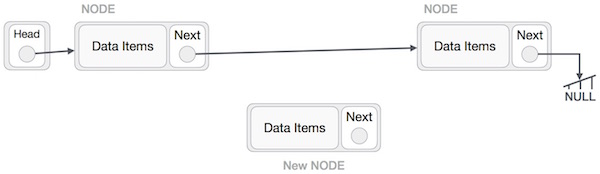
Linked List Insertion
Imagine that we are inserting a node B (NewNode), between A (LeftNode) and C (RightNode). Then point B.next to C −
NewNode.next −> RightNode;
It should look like this −
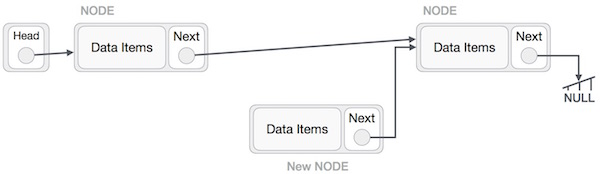
Linked List Insertion
Now, the next node at the left should point to the new node.
LeftNode.next −> NewNode;
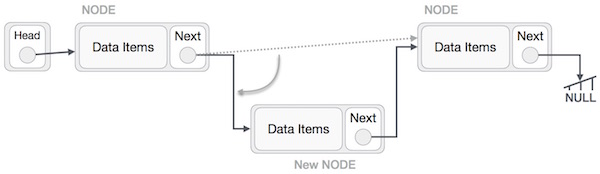
Linked List Insertion
This will put the new node in the middle of the two. The new list should look like this −

Linked List Insertion
Similar steps should be taken if the node is being inserted at the beginning of the list. While inserting it at the end, the second last node of the list should point to the new node and the new node will point to NULL.

Deletion Operation

Deletion is also a more than one step process. We shall learn with pictorial representation. First, locate the target node to be removed, by using searching algorithms.

Linked List Deletion
The left (previous) node of the target node now should point to the next node of the target node −
LeftNode.next −> TargetNode.next;

Linked List Deletion
This will remove the link that was pointing to the target node. Now, using the following code, we will remove what the target node is pointing at.
TargetNode.next −> NULL;

Linked List Deletion
We need to use the deleted node. We can keep that in memory otherwise we can simply deallocate memory and wipe off the target node completely.
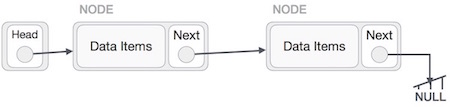
Linked List Deletion

Reverse Operation

This operation is a thorough one. We need to make the last node to be pointed by the head node and reverse the whole linked list.
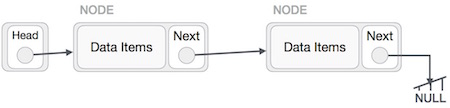
Linked List Reverse Operation
First, we traverse to the end of the list. It should be pointing to NULL. Now, we shall make it point to its previous node −
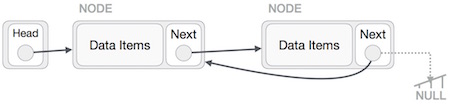
Linked List Reverse Operation
We have to make sure that the last node is not the lost node. So we'll have some temp node, which looks like the head node pointing to the last node. Now, we shall make all left side nodes point to their previous nodes one by one.
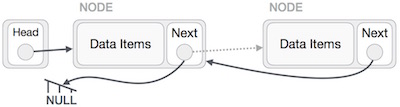
Linked List Reverse Operation
Except the node (first node) pointed by the head node, all nodes should point to their predecessor, making them their new successor. The first node will point to NULL.
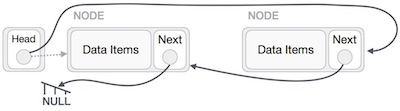
Linked List Reverse Operation
We'll make the head node point to the new first node by using the temp node.
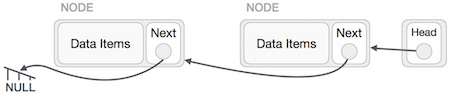
Linked List Reverse Operation
The linked list is now reversed. To see linked list implementation in C programming language, please click here.